
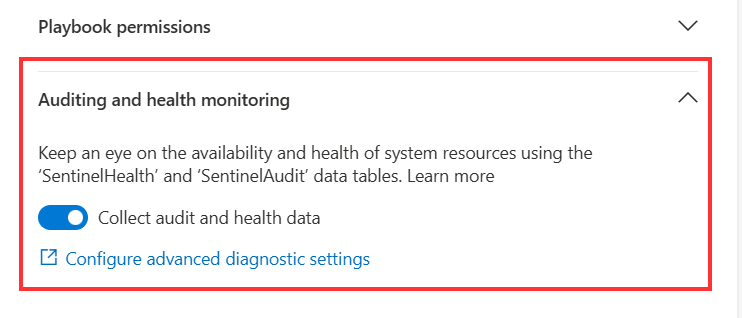
Enabling Sentinel Health using CI/CD
As I have previously discussed, I am a huge fan of the Health Feature within Microsoft Sentinel. I feel it provides a unique insight into the SIEM that everyone should be working in. Enabling manually Enabling Sentinel Health using the portal is pretty straight forward, as described on the Microsoft Learn page. To enable it:…
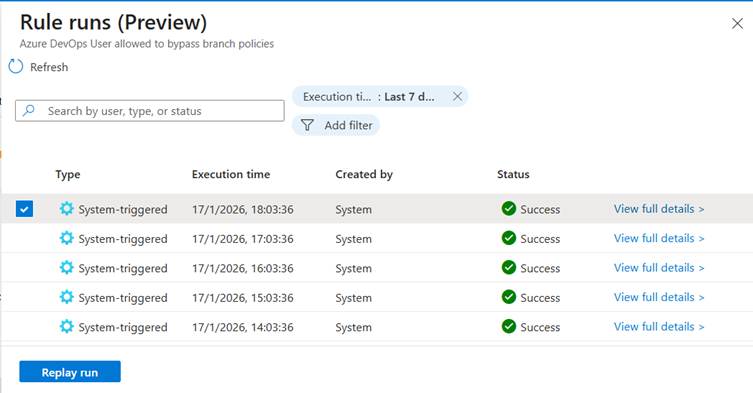
Sentinel Analytic Rule Failures: What to do?
Sentinel Analytic Rule Failures: What to do? Health Monitoring is probably one of the most underrated and underused feature of Microsoft Sentinel. It is a powerful part of the product that needs to be used by every SOC that relies on Sentinel. It is a common misconception that a PaaS product just runs fine and…

Identifying missing servers for Defender for Identity
Microsoft Defender for Identity is mostly associated with Domain Controllers, besides this, it also supports: Sometimes, it is difficult to know what servers are still to be onboarded. Using the portal Using the Security Portal, it is pretty easy to identify to be onboarded servers as covered in this video below. Go into the security…

A new, must-have Conditional Access policy
It has been a while since I have been really excited over a new feature/capability that Microsoft has released. Yesterday was one of these times, when Microsoft announced new supported scenarios for re-authentication. This opens up some new use cases, that should (in my opinion) be covered in every organization. In this blog, I want…

My wishlist for automation with Microsoft Defender XDR
During Ignite 2023, we were bombarded with announcements concerning AI. In the Security Space, the main announcement was Microsoft Security Copilot. This Copilot is meant to aid security analysts during an investigation. Another major announcement is ‘Microsoft Defender XDR’, besides a name change (again 😒), Microsoft is implementing a ‘Unified SecOps platform’, merging Microsoft Sentinel…

Discussion Leader for Automation and SOAR in Microsoft Security CCP
I am excited to share that I have been chosen as the discussion leader for Automation and SOAR within the Microsoft Security CCP. The Microsoft Security Customer Connection Program or CCP is a place where customers, partners and MVP’s meet with Microsoft Product teams. Here, we are able to discuss on upcoming features, influence future…

Incorrect creation time for incident creation in Microsoft Sentinel
One of the main benefits of Microsoft Sentinel as a SIEM is the tight integration with other Microsoft products such as Azure Active Directory and Microsoft 365 Defender. The integration of Microsoft 365 Defender and Microsoft Sentinel offers both bi-directional synchronization of incidents and synchronization of raw advanced hunting. While implementing a synchronization engine between…

Setting up an alternative email for an administrator
On one of my blogs on Practical 365, I discussed the need for separate administrator accounts. In my opinion, separate administrator accounts are necessary for adequate security posture. The question that often comes up is how you can ensure administrators still receive important emails from Microsoft 365 if their administrator account doesn’t have a mailbox.…

Choosing the correct FIDO2 keys
During previous blogs, I already talked about my love for passwordless. I really love the concept behind it and love it extensively. As a consultant, I have about 15 days Azure AD accounts which I use frequently. Each one of these has a randomly generated password of 128 characters stored in LastPass (That’s all fun…

Interacting with Key Vault from Logic Apps securely
When you are building out different Logic Apps (or Microsoft Sentinel Playbooks) it’s a best practice to never expose your passwords or API Keys in plain text within your Logic Apps. If you do, every user/administrator with read access to your environment will have access to your keys. In order to better protect your environment,…

Auditing used Power Automate Connections
While Power Automate is an amazing product, it’s a very dangerous tool to leave unmanaged as it is a common attack vector for data exfiltration. In previous blogs, I have talked about my hate relationship with Power Automate, but that doesn’t change the fact that it has valid business cases. As a security admin you…

Require Device Compliance for the non-primary user
As a lot of organizations are moving to the cloud, security becomes more and more important. While a most organizations have already enabled multifactor authentication, protecting your administrator accounts is of paramount importance. Within Conditional Access, we can filter on the compliance state of a device. The compliance state is retrieved from the Intune managed…

Can Chromebooks be managed with MEM?
Chromebooks have been hugely popular within the education space these last few years. They are positioned as affordable tablet computers running on Google’s ChromeOS. ChromeOS has a Play Store of it’s own where Android apps can be installed, but also some ChromeOS specific apps. As these tablets have been imbedded within the educational space for…

Why you should be using Azure Sentinel as an MSSP
If you have been following me on Twitter or my blog, it’s no secret that I absolutely love Azure Sentinel. It’s on the fastest moving product within the Microsoft Security stack and provides some awesome capabilities. But unfortunately, a lot of people seem to be afraid of it. When you start talking about a ‘SIEM’…

Road to passwordless: 1 year in
Passwordless was one of the big buzzwords in 2020 when you think about Identity & Access. The goal of it is pretty simple: remove all passwords in the day-to-day life of your end-users and remove them in your directory. I have blogged about it in 2019 and explained that the road to passwordless isn’t as…

The issue of Log Analytics column names and spaces
Today it’s time for a rather short blog post on an issue I ran into for which I couldn’t find anything online. The issue I have been working with the Sentinel API to create watchlists lately. During my endeavors, I ran into an issue when trying to use some of the columns of my watchlist.…

Pushing the MMA Agent with MEM in a smart way
The Microsoft Monitor Agent has had quite a long history with a lot of use cases. In the past it was used to send data to SCOM/OMS products, but nowadays this is often used to send data to Log Analytics/Sentinel. The Issue Different teams in your organization might have the need to connect the endpoints…

Why you should use Logic Apps instead of Power Automate
Microsoft offers a few ‘no-code’ automation solutions within Azure/Microsoft 365. If we take a look at the moment popular ones: Logic Apps and Power Automate, it’s often difficult to decide which one you should be using for your automation task. When we put the two next to each other, you will see that they look…

Configure Edge Chromium for a seamless end-user migration from Google Chrome with MEM
As you know by now, Edge Chromium is Microsoft’s newest browser which integrates Edge and Internet Explorer into the one browser to rule them all. There are a lot of valid reasons to migrate to it, but the most difficult part with is getting your users to adopt the new browser. In this blog post,…

An introduction into the Graph API
Whenever you are managing a Microsoft 365 environment, you regularly come across repetitive tasks: Creating new Intune policies Setting up users Retrieving security data … For all these tasks, Microsoft 365 has the ability for some automation. During this blog post, I will walk you through how to get started with the Graph API and…

AzureAD – Device not recognized as Hybrid Joined
If you are working with Office 365, some organizations will have the requirement that Office 365 data is only available offline when users are using their company-provided devices. This means users cannot sync work data onto their personal computers. Configuration The configuration is pretty simple, this can be done through a simple Conditional Access policy:…

Using a Lighthouse Service Principal within Azure DevOps
I just blogged on the website of The Collective about using a Lighthouse Service Principal from within Azure DevOps. We use this process internally to manage the Azure Sentinel environment of our customers. Check out the article here.

Hybrid vs Azure AD Join
When organizations are starting their journey to the cloud, they are most likely starting off by joining their Windows 10 machines to both their local Active Directory domain and Azure Active Directory in a Hybrid Azure AD Join. That way, they can enjoy the power of the cloud, while keeping all the legacy applications that…

Retire non-compliant devices through Power Automate
With the 2003 release of Microsoft Endpoint Microsoft, a new compliance setting was introduced to retire non compliant devices. It sounds like this would automatically retire non-complaint devices, but this is not the case. If a non-compliant has this setting assigned, the device shown up in the ‘Retire noncompliant devices’ section in the MEM portal.…

Assigning MDATP tags through the machine name & logged on user with Logic Apps
I recently published a blog on the website of The Collective (my employer), where I talk about assigning MDATP tags through Logic Apps. This article goes over a solution where tags are assigned according to the machine name and current logged on user of a MDATP device. I also touch on a few tips on…
Something went wrong. Please refresh the page and/or try again.
 365 by Thijs